
Viewing List of Bookings Page
Summary: This article provides instructions on how to view the bookings page.
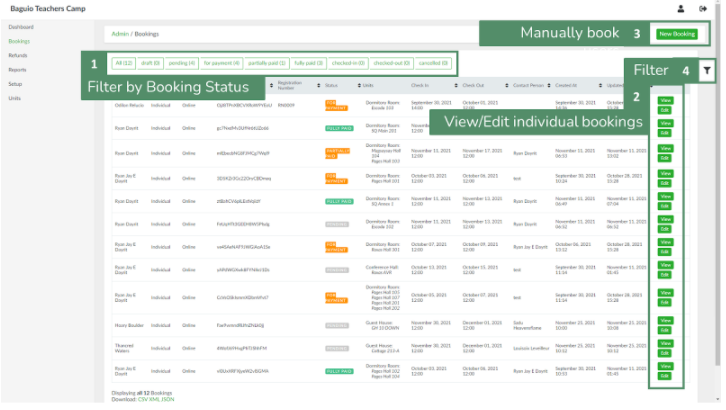
2. List can be filtered either by using the preset tabs based on booking status (1) or making use of the filter button (4).
3. To view a booking entry information, select a booking entry and click the View button (2).
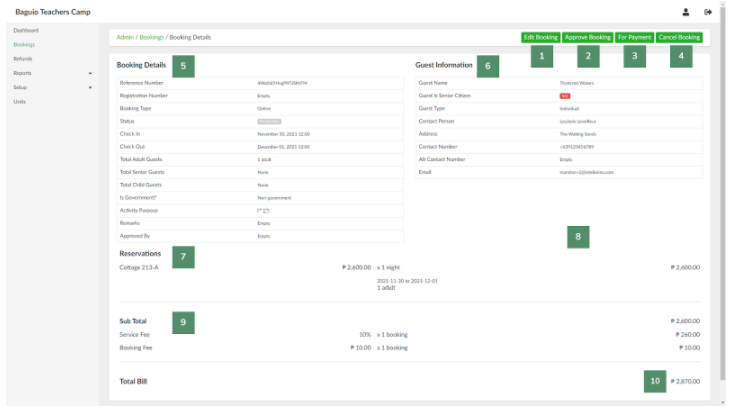
In the booking information page, the admin can:
- Edit Booking - update booking information, add reservations, add-ons, and additional fees.
- Approve Booking - approve booking. Name of admin who approved the booking will appear under Booking Details (#5)
- For Payment - change the status from PENDING to FOR PAYMENT and sends an email to user/client requesting for payment.
- Cancel Booking - cancel booking
- The admin can also review various information about the booking:
- Booking Details - Booking type, guest numbers, guest types etc.
- Guest information
- Reservations - reservation details and costs
- Bills - list of bills and their corresponding status.

- Subtotal - breakdown of fees
- Total - total payables

No Comments