
Cancelling Booking Entries
Summary: This articles provides instructions on how to cancel booking entries.
Note: Booking entries can be cancelled at any point from Pending status till Paid status. When underpaid status, a refund can be processed as well. Note that booking can only be cancelled before Checking-in.
To cancel a booking entry:
- In the booking entry information page, click the Cancel Booking button. This will open the Booking Cancellation page:
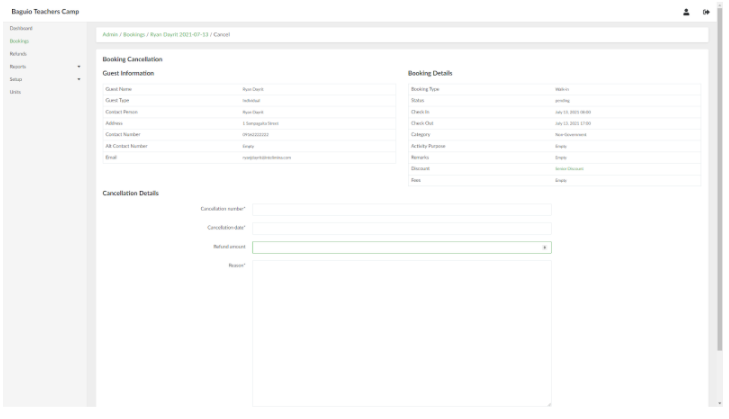
- Provide the necessary information for the booking cancellation. When done, click the Create Booking cancellation button. Note that any amount provided in the Refund amount field will be ignored if the booking entry is not underpaid status (i.e. the user has not paid yet).
- To access the list of refunds made, in the side navigation pane, click Refunds. This will open the list of Refunds page.
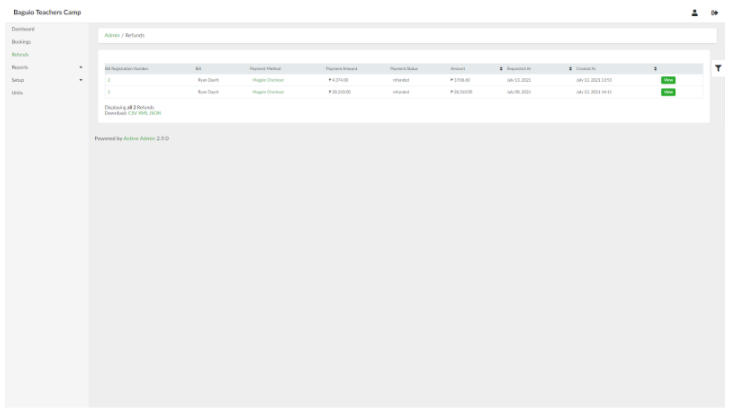
- Refund information can be viewed by selecting the Refund entry and clicking View.
No Comments