# Lodgings Page
**Summary: This article provides instructions on how to book using the Lodgings Page**
[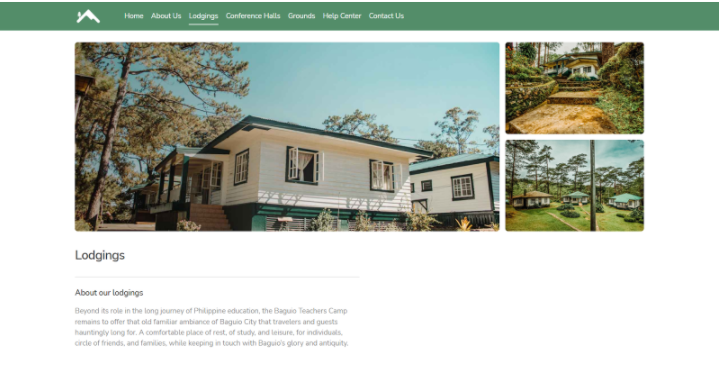](https://wiki.onlinedooze.com/uploads/images/gallery/2022-04/image-1649666845029.png)
**Lodgings Page** allows our guests to directly book the unit types offered.
*Search fields are automatically filled if the Guest used the main search bar from the **home page**, otherwise guests are prompted to enter their desired **Lodgings** booking details.*
[](https://wiki.onlinedooze.com/uploads/images/gallery/2022-04/image-1649667009757.png)
Upon filling up the details, the available units for reservation within the given details would be displayed in a list. Lodging units are aggregated based on their price, beds/rooms, and bathrooms.
[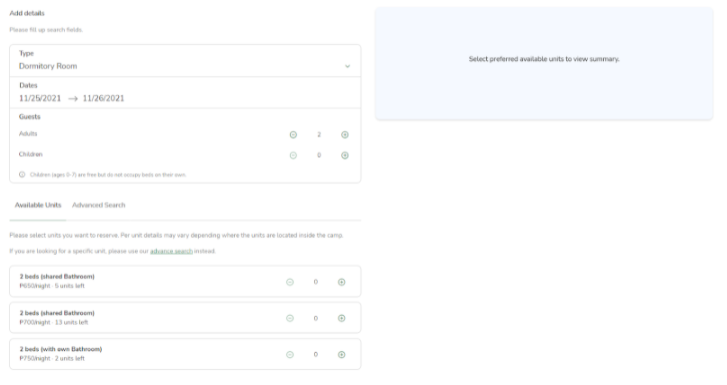](https://wiki.onlinedooze.com/uploads/images/gallery/2022-04/image-1649666943694.png)
If guests already have a specific unit in mind, they can click the **Advanced Search tab** to search for their desired unit(s).
[](https://wiki.onlinedooze.com/uploads/images/gallery/2022-04/image-1650256251487.png)
Using the screenshot above as an example, the guest can searching for a specific room type and searched "Hernandez Hall"
Guests can then choose which lodging units that are available for reservation. This would display a quick summary including the calculated price. Guests can also click the minus (**-**) button from the list to deselect any previously selected units in case they change their mind. Clicking the **“Reserve”** button would direct the guests to the booking details form.
[](https://wiki.onlinedooze.com/uploads/images/gallery/2022-04/image-1650256393938.png)
*Note: The “**?**” icons are clickable and will redirect to the guest to the help center page.*