# Bill Adjustments
**Summary: This article provides instructions on how to adjust the bill for bookings.**
**Note:** If the booking modification involves addition of fees, the system will request a bill adjustment - this will be indicated in the booking information page:
[](https://wiki.onlinedooze.com/uploads/images/gallery/2022-04/image-1649741118042.png)
**To process the bill adjustment:**
1. Scroll to the bottom of the booking details page and click the **Proceed with Bill Adjustment** button. This will add another payment entry under the Payments section. Note that if the bill has already been settled before, a bill adjustment will bring the bill back to Pending status:[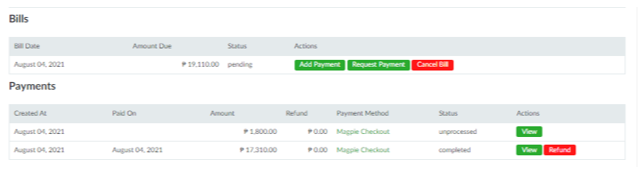](https://wiki.onlinedooze.com/uploads/images/gallery/2022-04/image-1649741138807.png)
2. Follow steps **\#6** onwards in the section[ **Processing Online Bookings**](https://wiki.onlinedooze.com/books/online-btc-guide-for-administrators/page/processing-online-bookings).